
Best gaming monitors under £300 (UK)
The Asus ROG Strix XG27ACS is the best gaming monitor under £300 for most people, with a fast, accurate 27-inch 1440p screen for around £228. If you'd rather spend less, the AOC Q27G4XF gets you 1440p at 180Hz on a fully adjustable stand for around £150.
Published 9 Nov 2026 · Last updated 14 Nov 2026
Quick picks
- Asus ROG Strix XG27ACS EDIT'S PICK · PC gamers who want a fast, accurate 1440p screen that also looks good for everything else · around £228
- AOC Gaming Q27G4XF BEST VALUE · First-time 1440p buyers on a tight budget who still want a proper adjustable stand · around £150
- AOC Gaming Q27G3XMN BEST PREMIUM · Players who want proper HDR, with bright highlights and deep blacks, without paying OLED prices · around £279
- AOC Gaming C27G4ZXE · Competitive players with a mid-range graphics card who care more about frame rate than sharpness · around £170
- Asus TUF Gaming VG289Q · PS5 and Xbox owners who want a sharp 4K picture at a desk and are happy at 60fps · around £269
No. 1 · EDIT'S PICK
Asus ROG Strix XG27ACS
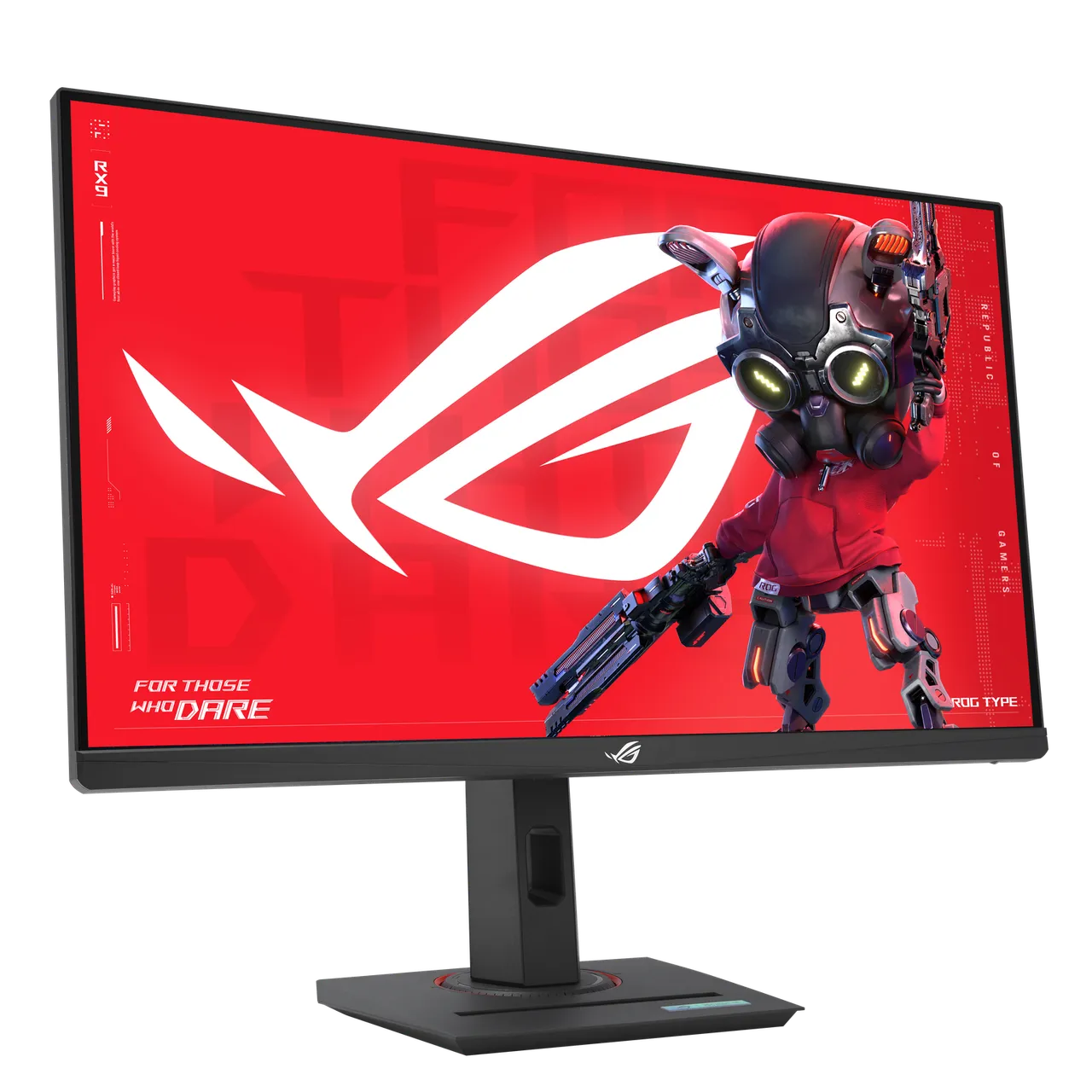
around £228 (price checked 14 Nov 2026)
A 27-inch 1440p (2560 x 1440) Fast IPS gaming monitor with a 180Hz refresh rate, a 1ms response time, FreeSync and G-Sync compatibility, and DisplayHDR 400. It has DisplayPort 1.4, HDMI 2.0 and a USB-C port that carries video.
Why we picked it
Tom's Hardware gives it an Editor's Choice award, praising a bright, sharp, colourful picture that's accurate without calibration, and says it beats most monitors at any price. PC Gamer scores it 90 and calls it the best all-round 1440p panel of its class. Both note the gaps. There are no speakers or USB ports, the USB-C port only supplies 7.5W, and HDR is limited without local dimming. The stand adjusts for height, tilt, swivel and portrait.
Best for: PC gamers who want a fast, accurate 1440p screen that also looks good for everything else
Skip it if: You want built-in speakers, USB ports for a keyboard and mouse, or a monitor that charges a laptop over USB-C.
| Screen | 27 inch Fast IPS, 2560 x 1440, 180Hz |
|---|---|
| HDR | DisplayHDR 400 |
| Inputs | DisplayPort 1.4, HDMI 2.0 (up to 144Hz), USB-C |
| Stand | Height, tilt, swivel, pivot |
| Speakers | None |
Retailer links coming soon.
No. 2 · BEST VALUE
AOC Gaming Q27G4XF
around £150 (price checked 14 Nov 2026)
A 27-inch 1440p Fast IPS monitor with a 180Hz refresh rate and a 1ms response time. It has one DisplayPort 1.4 input and one HDMI 2.0 input, with HDR10 support but no local dimming.
Why we picked it
It's the cheapest way we found to get 1440p at 180Hz on a stand that adjusts for height (130mm), tilt, swivel and portrait. Creative Bloq calls it one of the better gaming monitors under £200, liking the high refresh rate, QHD resolution and responsive feel, but finds the design plain and the ports limited. AOC says the HDMI input runs at up to 144Hz, with the full 180Hz over DisplayPort, and there are no built-in speakers.
Best for: First-time 1440p buyers on a tight budget who still want a proper adjustable stand
Skip it if: You need more than one HDMI port for a PC and a console, or you want speakers or HDR that makes a real difference.
| Screen | 27 inch Fast IPS, 2560 x 1440, 180Hz |
|---|---|
| HDR | HDR10 |
| Inputs | DisplayPort 1.4, HDMI 2.0 (up to 144Hz) |
| Stand | 130mm height, tilt, swivel, pivot |
| Speakers | None |
Retailer links coming soon.
No. 3 · BEST PREMIUM
AOC Gaming Q27G3XMN
around £279 (price checked 14 Nov 2026)
A 27-inch 1440p VA monitor with a 180Hz refresh rate and a mini-LED backlight split into 336 dimming zones. It's certified for DisplayHDR 1000 and has two HDMI 2.0 inputs and one DisplayPort 1.4.
Why we picked it
TFTCentral says the mini-LED backlight brings high-end HDR to a mainstream price, measuring around 657 nits in its default setting, and still lists it among its recommended gaming monitors as a very competitively priced option. It found an early European press sample had a broken sRGB mode, but says retail units it tested later worked properly. The on-screen menu is awkward to use, and there are no USB ports. The stand adjusts for height, tilt, swivel and portrait.
Best for: Players who want proper HDR, with bright highlights and deep blacks, without paying OLED prices
Skip it if: You play fast competitive shooters and want the cleanest motion, or you need USB-C or USB ports.
| Screen | 27 inch VA mini-LED, 2560 x 1440, 180Hz |
|---|---|
| Backlight | 336 local dimming zones |
| HDR | DisplayHDR 1000 |
| Inputs | 2 x HDMI 2.0, DisplayPort 1.4 |
| Stand | Height, tilt, swivel, pivot |
Retailer links coming soon.
No. 4
AOC Gaming C27G4ZXE
around £170 (price checked 14 Nov 2026)
A 27-inch 1080p curved (1500R) Fast VA monitor with a 280Hz refresh rate, a 1ms response time and a 4,000:1 contrast ratio. It has two HDMI 2.0 inputs and one DisplayPort 1.4.
Why we picked it
PC Gamer calls it a good budget choice for very high refresh rate gaming, well calibrated out of the box with low input lag. Its reservations are the low pixel density, middling pixel response with some overshoot at the fastest setting, and an HDR mode it describes as unusable. The stand only tilts, and AOC lists 240Hz as the maximum over HDMI, with 280Hz over DisplayPort. PC Gamer also points out that a 1440p 144Hz screen costs only a little more.
Best for: Competitive players with a mid-range graphics card who care more about frame rate than sharpness
Skip it if: You also use your monitor for work or reading, where 1080p at 27 inches looks soft, or you want an adjustable stand.
| Screen | 27 inch curved Fast VA, 1920 x 1080, 280Hz |
|---|---|
| Contrast | 4,000:1 |
| Inputs | 2 x HDMI 2.0 (up to 240Hz), DisplayPort 1.4 |
| Stand | Tilt only |
| Speakers | None |
Retailer links coming soon.
No. 5
Asus TUF Gaming VG289Q
around £269 (price checked 14 Nov 2026)
A 28-inch 4K (3840 x 2160) IPS monitor with a 60Hz refresh rate, a 5ms response time, FreeSync and HDR10 support. It has two HDMI 2.0 inputs, DisplayPort 1.2 and a pair of 2W speakers.
Why we picked it
TechRadar names it the best budget monitor for PS5, praising its value, rich colours and wide viewing angles, and says games look sharp on it. It also notes the limits. The HDR is only simulated, the refresh rate stops at 60Hz and the 5ms response time holds it back. It's the only pick here with built-in speakers, and the stand rises by up to 150mm, swivels and turns to portrait. It's an older model, so check stock before you set your heart on it.
Best for: PS5 and Xbox owners who want a sharp 4K picture at a desk and are happy at 60fps
Skip it if: You play on a PC with a strong graphics card, or want the 120fps modes that newer consoles offer.
| Screen | 28 inch IPS, 3840 x 2160, 60Hz |
|---|---|
| HDR | HDR10 |
| Inputs | 2 x HDMI 2.0, DisplayPort 1.2 |
| Stand | 150mm height, tilt, swivel, pivot |
| Speakers | 2 x 2W |
Retailer links coming soon.
How we chose
We started with the gaming monitor guides from PC Gamer, TFTCentral and TechRadar, then read individual reviews from Tom’s Hardware, PC Gamer, TFTCentral and Creative Bloq. That gave us a shortlist of about a dozen screens. We cut it to monitors on sale new in the UK for under £300 on the day we checked, which ruled out a few strong picks from smaller brands whose UK prices and stock we couldn’t confirm.
For most people we think 1440p at 27 inches is the sweet spot. It’s noticeably sharper than 1080p, and modern mid-range graphics cards can run it at high frame rates. So three of the five picks are 1440p screens, covering a cheap all-rounder, a better all-rounder and a mini-LED model for HDR.
We weighed motion clarity and colour accuracy from the reviews most heavily, then the stand, because a screen you can raise to eye level is easier to live with. We also checked each monitor’s HDMI inputs for console use. None of these has HDMI 2.1, which is still rare under £300, so we’ve noted what that means for PS5, Xbox and Switch 2 owners in the answers below.
This guide is based on manufacturer specs, retailer listings and expert reviews, listed below. We haven’t used these monitors ourselves. Prices are typical UK prices on the date shown beside each pick, and they move around Black Friday and Christmas.
Sources
- PC Gamer: Best gaming monitors in 2026
- TFTCentral: The best recommended gaming monitors 2026
- TechRadar: The best monitors for PS5 in 2026
- Asus ROG UK: ROG Strix XG27ACS
- Tom's Hardware: Asus ROG Strix XG27ACS review
- PC Gamer: Asus ROG Strix XG27ACS review
- Overclockers UK: Asus ROG Strix XG27ACS
- Asus press release: ROG Strix XG27UCS and XG27ACS
- AOC UK: Q27G4XF
- Creative Bloq: AOC Gaming Q27G4XF review
- TFTCentral: AOC Gaming Q27G3XMN review
- Scan: AOC Q27G3XMN/BK mini-LED gaming monitor
- AOC UK: C27G4ZXE
- PC Gamer: AOC Gaming C27G4ZXE review
- Asus UK: TUF Gaming VG289Q specifications
- PlayStation: Adjust 4K resolution on a PS5 console
- TweakTown: PlayStation 5 now supports 1440p variable refresh rate displays
- KitGuru: Switch 2's output and resolution settings fully detailed
- ViewSonic: How to output video at 120Hz from PS5 or Xbox Series X/S
FAQs
Should I buy 1080p or 1440p?
At 27 inches, 1440p looks noticeably sharper. PC Gamer points out the 1080p AOC C27G4ZXE has a low pixel density of about 82 pixels per inch, and that a 1440p screen costs only a little more. Pick 1080p only if you want the highest frame rates from a mid-range graphics card, mainly in competitive games.
Will these monitors work with a PS5?
Yes. Sony says the PS5 can output 1440p at 60Hz or 120Hz if the screen supports it, and the makers say the Asus XG27ACS and AOC Q27G4XF run at up to 144Hz over HDMI, and the AOC C27G4ZXE at up to 240Hz, so all three can take a 120Hz signal. The 4K Asus TUF runs at 60Hz. Two things need HDMI 2.1, which none of these picks have. Those are 4K at 120Hz, per Sony, and variable refresh rate at 1440p, per TweakTown's report of Sony's update notes.
What about Nintendo Switch 2?
KitGuru reports that the Switch 2 dock can output 4K, or up to 120fps, but not both at once, and that 120Hz output is limited to 1080p. So any of these monitors will work, and the Asus TUF VG289Q's 4K screen suits it best for sharpness.
How much refresh rate do I need?
For PC gaming, 144Hz to 180Hz is a big step up from 60Hz, and every 1440p pick here reaches 180Hz over DisplayPort. Consoles top out at 120Hz, so anything above that only matters for a PC. Very high rates such as 280Hz mainly help competitive players with a graphics card that can keep up.
Last updated 14 Nov 2026.