
Best budget laptops under £500 (UK)
The Lenovo IdeaPad Slim 3x is the best all-rounder under £500, with 16GB of memory and very long battery life for around £499. If you only need the web and Google Docs, the Asus Chromebook CX15 does the basics for around £159.
Published 31 Oct 2026 · Last updated 14 Nov 2026
Quick picks
- Lenovo IdeaPad Slim 3x (15-inch, Snapdragon X) EDIT'S PICK · Students and home users who want a Windows laptop that lasts a full day away from the plug · around £499
- Asus Chromebook Plus CX15 · Students who live in Google Docs, Gmail and the browser and want a big screen and plenty of storage · around £499
- Lenovo V15 G4 AMN · Anyone who needs full Windows and plenty of storage for as little as possible · around £430
- Asus Chromebook CX15 BEST VALUE · Younger students, second laptops and anyone who mostly browses, streams and writes · around £159
No. 1 · EDIT'S PICK
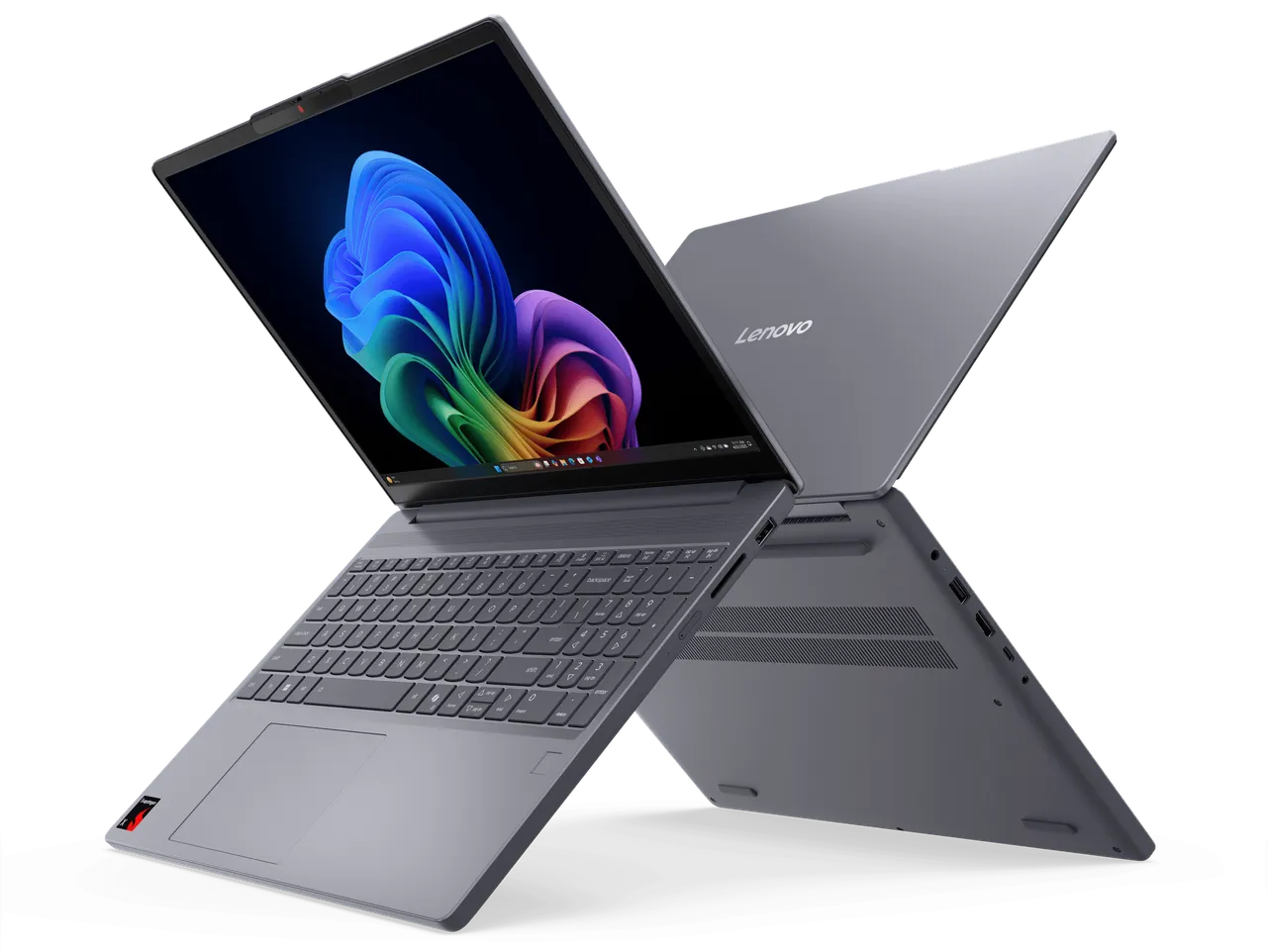
Lenovo IdeaPad Slim 3x (15-inch, Snapdragon X)
around £499 (price checked 14 Nov 2026)
A 15.3-inch Windows 11 laptop built around Qualcomm's Snapdragon X, an Arm chip like the ones in phones, with 16GB of memory, a 256GB SSD and a 1920 x 1200 non-touch screen. It weighs about 1.6kg and has two USB-A ports, USB-C, HDMI, an SD card reader and Wi-Fi 7.
Why we picked it
Tom's Guide makes it the top pick in its guide to the best cheap laptops and measured over 16 hours of web browsing on one charge. Notebookcheck rates it "good" and says the processor is fast for the price. 16GB of memory is unusual at this price and gives it room to grow. The trade-offs are the ones you'd expect for the money. Both reviewers found the screen dull, Notebookcheck notes the keyboard isn't backlit and the touchpad feels cheap, and Tom's Guide warns that some apps may not be compatible with its Arm chip.
Best for: Students and home users who want a Windows laptop that lasts a full day away from the plug
Skip it if: You rely on older Windows software, specialist plug-ins or games, or you need a bright screen for working outdoors.
| Processor | Qualcomm Snapdragon X (X1-26-100) |
|---|---|
| Memory and storage | 16GB, 256GB SSD |
| Screen | 15.3-inch, 1920 x 1200, IPS, 300 nits (Lenovo's figure) |
| Weight | About 1.6kg |
| Operating system | Windows 11 Home |
Retailer links coming soon.
No. 2
Asus Chromebook Plus CX15

around £499 (price checked 14 Nov 2026)
A 15.6-inch Chromebook with an Intel Core 3 N355 processor, 8GB of memory, 256GB of storage and a Full HD matte screen, plus a 1080p webcam with a privacy shutter. It carries Google's Chromebook Plus badge, which the cheaper CX15 doesn't.
Why we picked it
It's the step up from the cheaper CX15 below, with double the memory and four times the storage, which is what Which? recommends to avoid slowdowns. It also has a 1080p webcam rather than the basic one on the cheaper model. One catch, listed by both John Lewis and Very, is that it comes without a charger, so budget for a USB-C one if you don't have one. We haven't found a full expert review of this version, so this pick leans on the specs and the reviews of the earlier CX15.
Best for: Students who live in Google Docs, Gmail and the browser and want a big screen and plenty of storage
Skip it if: You need Microsoft Office desktop apps or other Windows software, or you don't already own a USB-C charger.
| Processor | Intel Core 3 N355 |
|---|---|
| Memory and storage | 8GB, 256GB eMMC |
| Screen | 15.6-inch, 1920 x 1080, matte, 300 nits (Asus's figure) |
| Weight | About 1.6kg |
| In the box | No charger |
Retailer links coming soon.
No. 3
Lenovo V15 G4 AMN
around £430 (price checked 14 Nov 2026)
A no-frills 15.6-inch Windows 11 laptop from Lenovo's business range, with an AMD Ryzen 5 7520U processor, 8GB of memory and a 512GB SSD. It has a Full HD TN screen, two USB-A ports, USB-C, HDMI and a wired Ethernet port, and weighs about 1.6kg.
Why we picked it
It's the cheapest way we found to get a recent Windows laptop with a full 512GB SSD, and it runs ordinary Windows software without the app worries of an Arm chip. The compromises are clear from the spec sheet rather than from reviews, as we couldn't find a recent expert review of it. The TN screen is rated at only 250 nits, the 8GB of memory is soldered and can't be upgraded, and Lenovo claims about eight hours of battery life.
Best for: Anyone who needs full Windows and plenty of storage for as little as possible
Skip it if: You care about screen quality or battery life, or you want a laptop to carry around all day.
| Processor | AMD Ryzen 5 7520U |
|---|---|
| Memory and storage | 8GB (not upgradeable), 512GB SSD |
| Screen | 15.6-inch, 1920 x 1080, TN, 250 nits |
| Weight | About 1.6kg |
| Warranty | One year |
Retailer links coming soon.
No. 4 · BEST VALUE
Asus Chromebook CX15
around £159 (price checked 14 Nov 2026)
A basic 15.6-inch Chromebook with an Intel N50 processor, 4GB of memory, 64GB of storage and a Full HD anti-glare screen. It has USB-A, USB-C and HDMI, a webcam with a privacy shutter, and weighs about 1.6kg.
Why we picked it
Tom's Guide and TechRadar both name the CX15 their best budget Chromebook, praising the value, the large screen and the comfortable keyboard. Both reviewed the earlier version with an Intel Celeron N4500 chip; the model on sale now uses the newer N50. Tom's Guide found performance lacking and the touchpad cheap-feeling, and both measured only around seven hours of battery life. With 4GB of memory it will slow down with lots of tabs open, which is the price of a laptop this cheap.
Best for: Younger students, second laptops and anyone who mostly browses, streams and writes
Skip it if: You keep lots of tabs open, edit photos, or need the laptop to last more than a few years.
| Processor | Intel N50 |
|---|---|
| Memory and storage | 4GB, 64GB eMMC |
| Screen | 15.6-inch, 1920 x 1080, anti-glare, 300 nits (Asus's figure) |
| Weight | About 1.6kg |
| Operating system | ChromeOS |
Retailer links coming soon.
How we chose
We started with the budget laptop and Chromebook recommendations from Tom’s Guide, TechRadar and T3, the buying advice in Which?’s cheap laptop guide, and Notebookcheck’s lab review of the IdeaPad Slim 3x. That gave us a shortlist of around a dozen, which we narrowed to laptops we could find on sale new from UK retailers for £500 or less.
Several well-reviewed models dropped out at that stage. The HP Chromebook Plus 15.6-inch and Acer Chromebook Plus 514, both strong picks in TechRadar’s guide, were out of stock or no longer listed at the UK retailers we checked, and the Acer Aspire Go 15 we looked at had sold out too. We’ll add them back if stock returns.
For a laptop at this price, we weighed everyday speed, memory and storage most heavily, because those decide whether it still feels usable in two or three years. Battery life and screen quality came next, then weight and ports.
It’s worth being clear about what £500 doesn’t buy. Expect plastic bodies, screens that are fine indoors but dim and dull next to a pricier laptop, basic webcams and speakers, and no backlit keyboard. None of these laptops is built for games or serious video editing.
This guide is based on manufacturer specs, retailer listings and expert reviews, listed below. We haven’t used these laptops ourselves. Prices are typical UK prices on the date shown beside each pick, and they move around Black Friday and Christmas.
Sources
- Tom's Guide: Best laptops under 500 dollars
- Tom's Guide: The best budget laptops
- Tom's Guide: The best Chromebooks
- TechRadar: The best Chromebook
- Which?: Best cheap laptops
- T3: Best laptops under £500
- Notebookcheck: Lenovo IdeaPad Slim 3 15Q8X10 review
- John Lewis: Lenovo IdeaPad Slim 3x, Snapdragon X, 16GB, 256GB (specifications)
- PriceSpy UK: Lenovo IdeaPad Slim 3 83N30029UK, Snapdragon X, 16GB, 256GB
- Lenovo News: MWC 2025 IdeaPad and Yoga announcements
- John Lewis: Asus Chromebook Plus CX15, Intel Core 3, 8GB, 256GB
- Very: 15.6-inch Chromebooks
- Asus Press: Announcing the new Asus Chromebook CX14/CX15 series
- Argos: Asus CX15 15.6in N50 4GB 64GB Chromebook
- Laptops Direct: Lenovo V15 AMD Ryzen 5 8GB 512GB
- Box: Lenovo V15 G4 AMN Ryzen 5 8GB/512GB
- Laptop Outlet: Lenovo V15 G4 AMN Ryzen 5 8GB/512GB
FAQs
Should I buy a Chromebook or a Windows laptop?
A Chromebook suits you if most of what you do happens in a web browser, such as Google Docs, Gmail, streaming and research. If your course or job needs desktop Microsoft Office, specialist Windows software or games, buy a Windows laptop.
How much memory and storage do I need?
Which? recommends at least 8GB of memory to avoid slowdowns, and at least 256GB of storage on a Windows laptop, as Windows 11 itself takes up a lot of it. A Chromebook keeps most files online, so Which? says 64GB is the minimum there. The 4GB Asus CX15 works for light use but will slow down if you keep lots of tabs open.
What do you give up on a laptop under £500?
Mainly the screen, the build and the speed. Cheap laptops tend to have dimmer screens with weaker colours, plastic bodies, no keyboard backlight and basic webcams, and their processors struggle with video editing and games. Battery life varies a lot, from about seven hours on the cheapest Chromebook here to over 16 hours in Tom's Guide's test of the IdeaPad Slim 3x.
Will Windows apps work on the Snapdragon laptop?
Not always. Tom's Guide lists app compatibility as a drawback of the IdeaPad Slim 3x's Arm-based Snapdragon chip, and says its gaming performance is poor. Check that any software your course or job requires has a version for Windows on Arm before you buy, or choose the Lenovo V15, which uses a conventional AMD chip.
Last updated 14 Nov 2026.